
Blog
How to Identify and Fix Common Embroidery Design Errors
By Ramana Machines · October 26, 2026
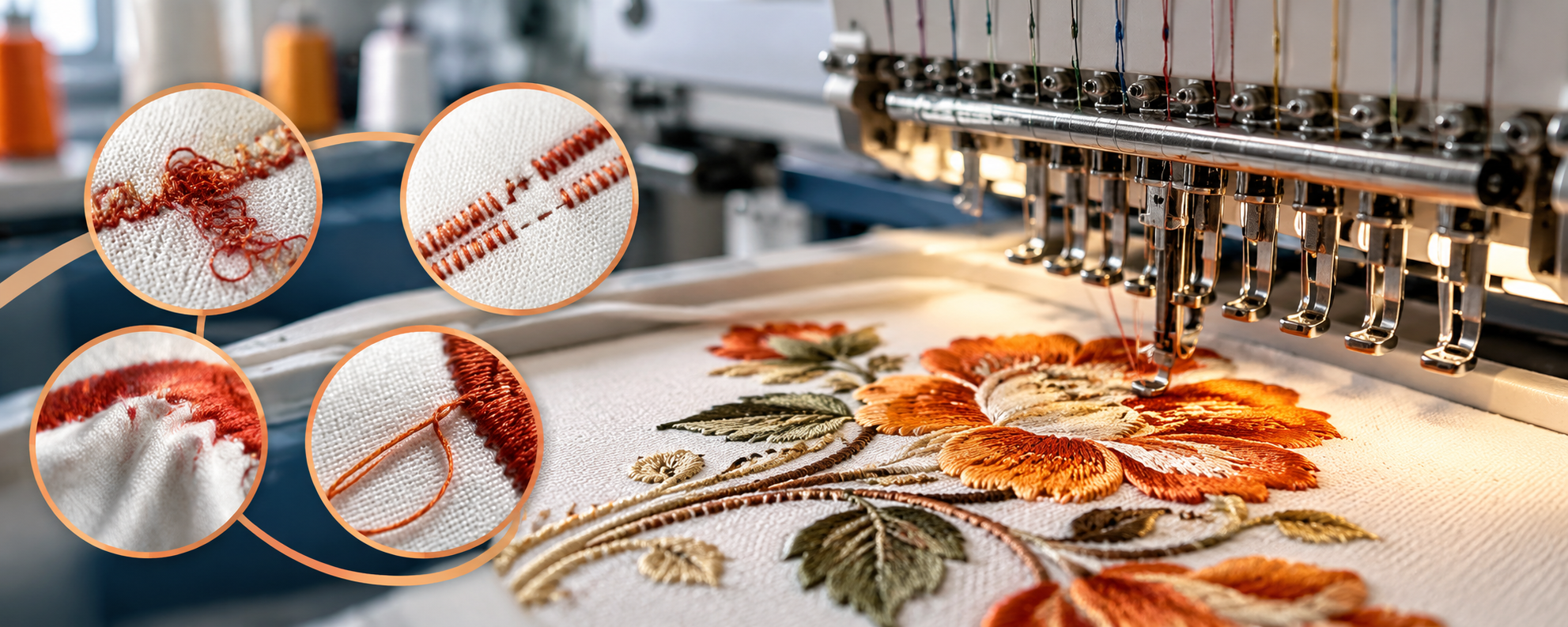
Embroidery design errors can cause thread breaks, fabric puckering, missing stitches, and uneven lettering. Learn how to identify common problems, correct digitizing and machine settings, and improve embroidery quality before starting bulk production.
Embroidery design errors can affect stitch quality, fabric appearance, production speed, and the overall finish of an embroidered product. Problems such as thread breaks, missing stitches, puckering, misaligned designs, and uneven lettering can lead to fabric waste and costly rework.
For embroidery businesses, identifying these problems early is important for maintaining consistent quality and meeting customer deadlines. Many embroidery errors can be reduced by checking the design file, choosing suitable stitch settings, preparing the fabric correctly, and maintaining the machine.
In this guide, we explain how to identify common embroidery design errors, what causes them, and how to fix them before they affect an entire production batch.
1. Thread Breaks During Embroidery
Thread breaks are among the most common problems in embroidery production. Frequent breaks interrupt the machine, reduce output, and may leave gaps in the design.
Common causes:
- Incorrect thread tension.
- Poor-quality or damaged thread.
- A bent, blunt, or incorrectly installed needle.
- Excessive stitch density.
- Sharp turns or overly short stitches in the design.
- Problems with the thread path or machine components.
How to fix it:
Check the thread path and tension first. Inspect the needle for damage and replace it if necessary. Review the design for dense stitch areas, overlapping stitches, and abrupt direction changes. Use thread and needle types suitable for the fabric and embroidery thread.
If thread breaks repeatedly at the same point in the design, inspect that section of the digitized file instead of adjusting machine tension repeatedly.
2. Missing Stitches and Gaps in the Design
Missing stitches appear when parts of the design are not embroidered correctly. These gaps can make logos, text, and decorative patterns look incomplete.
Common causes:
- Needle or hook timing problems.
- Damaged needles.
- Incorrect thread tension.
- Poor digitizing.
- Very short stitches or unsuitable stitch settings.
- Fabric movement during embroidery.
How to fix it:
Inspect the needle, bobbin, and thread path. Confirm that the fabric is secured properly in the hoop or frame. If the machine is mechanically sound but the same gaps appear repeatedly, review the design file for unsuitable stitch lengths, incorrect stitch direction, or poorly planned overlaps.
Run a test design after making adjustments to confirm that the missing stitches have been corrected.
3. Fabric Puckering Around the Embroidery
Puckering occurs when the fabric gathers or wrinkles around the stitched area. It is especially noticeable on lightweight fabrics, large filled designs, and garments where a smooth finish is important.
Common causes:
- Excessive stitch density.
- Incorrect stabilizer selection.
- Loose hooping or uneven fabric tension.
- Too much thread tension.
- Incorrect stitch direction or design compensation.
How to fix it:
Use a stabilizer appropriate for the fabric and design size. Hoop the fabric evenly without stretching it excessively. Review the design density and reduce unnecessary overlapping stitches. Test different underlay and pull-compensation settings where needed.
For delicate fabrics, use a sample to confirm the correct combination of stabilizer, needle, tension, and stitch settings before starting bulk production.
4. Incorrect Stitch Density
Stitch density refers to how closely stitches are placed together in a design. Too many stitches can make the embroidery stiff, bulky, or difficult to sew. Too few stitches may leave fabric visible through filled areas.
Density problem | What you may notice | How to correct it |
| Excessive density | Hard embroidery, thread breaks, puckering | Remove unnecessary stitches and adjust density |
| Low density | Gaps or visible fabric | Increase coverage where needed |
| Uneven density | Inconsistent appearance | Review stitch settings across design sections |
| Excessive overlap | Thick or raised areas | Correct overlapping objects and stitch paths |
The correct density depends on fabric type, thread thickness, stitch type, and design size. Increasing density is not always the best way to improve coverage; underlay and stitch direction also matter.
5. Misaligned or Distorted Embroidery Designs
A design may appear shifted, stretched, or distorted compared with the original artwork. This can be particularly noticeable on logos, lettering, and repeated designs across multiple garments.
Common causes:
- Fabric slipping inside the hoop.
- Incorrect hoop placement.
- Poor digitizing or stitch compensation.
- Fabric stretching during hooping.
- Incorrect machine settings or frame alignment.
How to fix it:
Check that the hoop is secure and the fabric is positioned correctly. Use appropriate stabilizer and avoid stretching the material during hooping. Confirm the design dimensions and machine positioning before production.
If the design remains distorted, review the digitized file and test suitable pull compensation. For multi-head production, verify that the design is positioned consistently across all heads.
6. Poor Lettering and Small Text
Small text can be difficult to embroider clearly. Letters may close up, lose their shape, or become hard to read when the stitch settings are unsuitable.
Common causes:
- Lettering that is too small.
- Excessive stitch density.
- Incorrect stitch type.
- Poorly digitized corners and curves.
- Unsuitable thread or fabric combinations.
How to fix it:
Use a font size appropriate for embroidery rather than relying only on how the text looks on a screen. Review the lettering's stitch type, density, and underlay. Simplify small text when possible, and avoid unnecessary fine details that cannot be reproduced clearly with thread.
Always test small lettering on the actual fabric before approving the design.
7. Incorrect Stitch Direction and Fill Patterns
Stitch direction affects the appearance, texture, and stability of embroidered areas. Poorly planned stitch angles can create visible gaps, uneven shine, or unnecessary fabric distortion.
Common causes:
- Incorrect fill direction.
- Poor transitions between design objects.
- Inappropriate stitch types.
- Lack of suitable underlay.
- Overlapping areas with conflicting stitch directions.
How to fix it:
Review the stitch direction for each part of the design. Use suitable fill, satin, or running stitches according to the shape and size of each element. Plan overlaps carefully and use underlay where needed to support the top stitches.
A well-digitized design should balance visual coverage, stitch quality, and efficient machine movement.
8. Thread Loops and Loose Stitches
Loose loops on the top or underside of the fabric can affect the finish and may cause further stitching problems.
Common causes:
- Incorrect upper-thread or bobbin tension.
- Thread not seated correctly in the tension system.
- Lint or debris around the bobbin area.
- Damaged needle or thread path.
- Incorrect threading.
How to fix it:
Re-thread the machine according to the manufacturer's instructions and check the bobbin installation. Clean the designated areas safely and inspect the needle. Adjust tension gradually and test on a fabric sample rather than making several changes at once.
If loops continue, have the machine inspected for hook timing or other mechanical problems.
9. Incorrect Underlay Settings
Underlay stitches provide a foundation for the visible embroidery. They help support the fabric, improve coverage, and reduce distortion. Incorrect underlay can make embroidery look bulky or unstable.
Common causes:
- Too much underlay.
- Insufficient support beneath large filled areas.
- Incorrect underlay type.
- Poor matching between the underlay and top-stitch direction.
How to fix it:
Choose underlay settings based on the fabric, design object, and stitch type. Large filled areas may need a different foundation from narrow satin lettering. Reduce unnecessary underlay where the embroidery becomes too bulky, but ensure there is enough support to maintain shape and coverage.
Test the revised design before using it for a large order.
10. Excessive Stitch Count and Slow Production
A design with unnecessary stitches can increase production time, thread consumption, and the chance of thread breaks. A high stitch count is not automatically a sign of better quality.
Common causes:
- Excessive overlapping stitches.
- Poor digitizing.
- Unnecessary travel stitches.
- Overly dense fills.
- Design details that do not improve the final appearance.
How to fix it:
Ask a digitizer to review the design for unnecessary stitches, inefficient travel paths, and overlapping objects. Simplify details that do not translate well into embroidery. Check the final appearance after editing to ensure that reducing the stitch count does not create gaps or weaken the design.
The aim is to achieve the required appearance with an efficient and reliable stitch plan.
A Quick Guide to Common Embroidery Design Errors
Problem | First thing to check | Main goal |
| Thread breaks | Thread path, needle, and tension | Reduce interruptions |
| Missing stitches | Needle condition and design file | Achieve complete coverage |
| Fabric puckering | Stabilizer, hooping, and density | Keep fabric flat |
| Poor lettering | Font size and stitch settings | Improve readability |
| Design distortion | Hoop position and compensation | Maintain shape and alignment |
| Thread loops | Threading and tension | Create balanced stitches |
| Uneven fill | Density, underlay, and stitch direction | Improve coverage |
| Slow production | Stitch count and travel paths | Improve efficiency |
How to Prevent Embroidery Design Errors Before Production
Fixing errors after production begins can waste fabric, thread, and machine time. A consistent pre-production check helps reduce these risks.
Before starting an order:
- Check the design file: Confirm the design dimensions, stitch types, density, underlay, and stitch sequence.
- Use the correct file format: Ensure the embroidery file is compatible with the machine and contains the required stitch information.
- Prepare the fabric: Select suitable needles, thread, stabilizer, and hooping methods.
- Check the machine: Inspect threading, bobbin installation, needles, and other routine maintenance points.
- Run a sample: Embroider a test on the actual fabric before approving bulk production.
- Inspect the result: Check lettering, coverage, alignment, thread breaks, and fabric distortion.
- Record successful settings: Save the approved design and process settings for repeat orders.
These checks are especially useful for businesses producing logos, uniforms, caps, garments, and other embroidered products in large quantities.
Does Your Embroidery Machine Affect Design Quality?
Yes. Machine condition, thread handling, speed control, and frame stability can all affect the final embroidery result. However, not every stitching problem is caused by the machine itself. Poor digitizing, incorrect stabilizer selection, and unsuitable design settings can also produce defects.
When comparing equipment, consider the number of heads, working area, supported design formats, control system, operating speed, maintenance requirements, and availability of spare parts and technical support.
If you are researching the best multi head embroidery machine price, compare the full machine specifications and expected production requirements rather than choosing based on price alone. A suitable machine should match your order volume, design complexity, fabric types, and available workspace.
Improve Embroidery Quality with the Right Design and Machine Setup
Identifying embroidery design errors early helps reduce rework, improve stitching consistency, and maintain production efficiency. By checking digitized files, selecting suitable stabilizers, maintaining correct tension, and testing designs before bulk production, embroidery businesses can avoid many common problems.
Ramana Machines helps textile and garment businesses explore machinery suited to their production requirements. Contact the team to discuss embroidery machine options, technical specifications, and support for your business.
Related
More insights
26 Oct 2026
What Warranty and Technical Support Should You Expect When Buying a Multi Head Embroidery Machine?
View26 Oct 2026
What Warranty and Technical Support Should You Expect When Buying a Multi Head Embroidery Machine?
Warranty coverage and technical support can make a major difference to your embroidery production. Learn what to check before buying a multi head embroidery machine, from repair coverage and operator training to spare parts availability and overseas supplier support.
View
26 Oct 2026
How to Reduce Thread Breakage During Embroidery Production
View26 Oct 2026
How to Reduce Thread Breakage During Embroidery Production
Frequent thread breaks can slow embroidery production, increase rework, and affect stitch quality. Learn how to identify common causes and improve performance through correct tension, suitable needles, better digitizing, proper fabric preparation, and regular machine maintenance.
View
19 Oct 2026
What to Check Before Buying a Multi Head Embroidery Machine
View19 Oct 2026
What to Check Before Buying a Multi Head Embroidery Machine
Learn what to check before buying a multi head embroidery machine, including machine speed, heads, fabric compatibility, price, maintenance, and supplier support.
ViewFrequently Asked Questions
Find answers to the most common questions about our machines, services and support.
Common problems include thread breaks, missing stitches, fabric puckering, incorrect stitch density, distorted designs, poor lettering, and uneven fill coverage.
A screen preview does not always show how thread, fabric, stabilizer, and stitch density will interact. The design may need adjustments to stitch direction, underlay, density, or pull compensation. A sample stitch-out helps reveal these issues.
Use the correct stabilizer, hoop the fabric evenly, manage thread tension, and avoid excessive stitch density. Test the design on the actual fabric before bulk production.
Possible causes include incorrect threading, unsuitable tension, a damaged needle, poor-quality thread, lint buildup, or dense sections in the design. If breaks repeatedly occur at the same design point, review that section of the digitized file.
Choose a suitable font size, simplify fine details, and use appropriate stitch types and density. Test the lettering on the intended fabric to ensure it remains readable.
Yes. Excessive stitch counts, unnecessary overlaps, and inefficient travel paths can increase production time and may cause more thread breaks. Good digitizing balances appearance, stitch quality, and efficiency.
Compare the number of heads, embroidery area, supported designs, control system, production requirements, maintenance needs, spare-parts availability, and after-sales support. Consider how well the machine suits your actual workload.